SUBSYSTEM 06

Adaptive Mobile Yard Scanner

Know which trailer is where. Capture it as your tugs work, or verify parked trailers with a dedicated van or car. Built around the way your yard operates.

ONE SYSTEM, DIFFERENT WORKFLOWS

Your yard sets the route. We adapt the scanner.

No two ports have the same layout, traffic or operating model. Capture trailer data during the work already happening, or send a light vehicle to check what is parked. The right approach starts with your operation.

IN SERVICE · ROSSLARE EUROPORT

Scan while your tugs work.

The tug-mounted approach is already live at Rosslare Europort. Cameras travel with the terminal tractor during its normal load, drop and transfer movements, turning routine trips into trailer observations.

The existing configuration uses three Lynet cameras: two roof-mounted cameras read the yard to either side, and a rear camera observes the trailer being handled. Images, IDs, timestamps, GPS and relative direction give your yard system the inputs for movement tracking and LOAD/DROP interpretation.

Best fit: inventory capture alongside everyday trailer handling.

Four views of an in-service terminal tractor, showing the yard-scanner camera mounted on its cab roof.
Existing tug installation — from the working vehicle to the roof-mounted camera.
EUROPEAN YARD · POC IN PROGRESS

Check the yard with a lighter vehicle.

When trailers are already parked, a service van or car can drive a survey route to identify them and verify their placement. Tugs remain available for handling work, without allocating a tug and its fuel use to a dedicated survey.

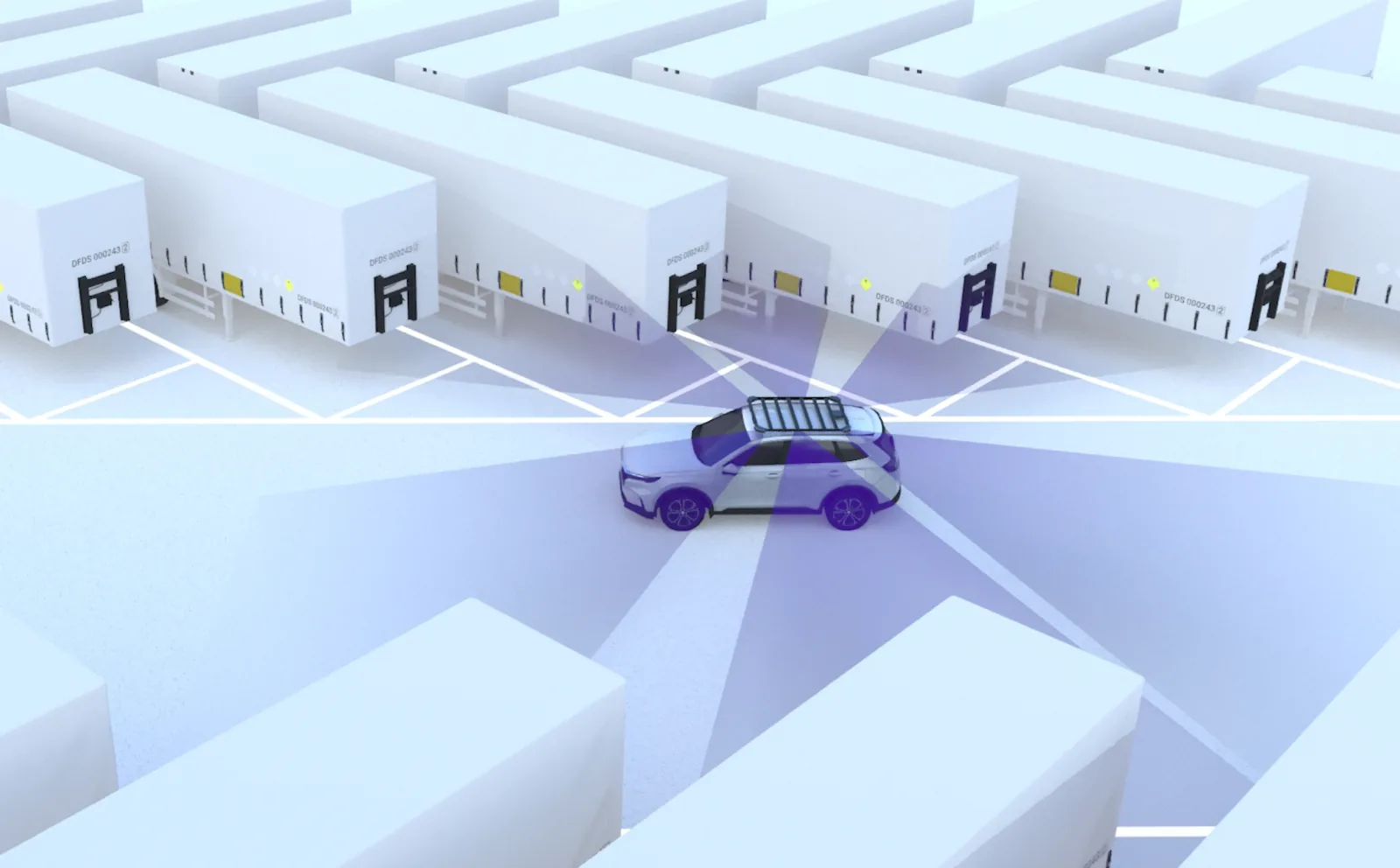
Our latest proof of concept is being tailored for a large European port. Six independently operating cameras share a central roof mount. The relevant cameras capture each trailer’s coupling face as the vehicle approaches or passes, according to the direction of travel and the parking layout.

Best fit: scheduled checks of parked trailers, their positions and assigned bays.

Visualisation of a survey car driving between rows of parked trailers, with six camera fields of view fanning out from its central roof mount.
Six separate camera views, selected for the direction of travel — not a stitched 360° view. PoC visualisation.

THE LATEST CONFIGURATION

A yard survey, from camera to record.

Follow the van through different parking layouts. See individual cameras activate, trailer IDs linked to positions and bays, and repeat observations brought together for inventory review.

60 seconds · 1080p · Silent animationPoC in progress — illustrative workflow, under development.
What the film demonstrates

Six cameras operate separately as the van changes direction. They capture the trailer’s coupling face, where a unit number, plate or configured code can be visible. Observations are associated with positions and parking bays, with repeated reads reconciled and obscured or unreadable IDs flagged for review. The vehicle surveys trailers already placed in the yard; it does not load or drop them. This animation illustrates the intended workflow of the current PoC, not a completed production deployment.

Vehicle model: DHL Delivery Van by memoov, used under CC BY 4.0. Livery modified; camera rig, yard scene and animation created for Adaptive Port Systems.

FROM OBSERVATION TO INVENTORY

Different routes. A useful record at the end.

The vehicle and camera configuration change. The purpose stays the same: give your operation trailer identity, location context and image evidence it can use.

01

Capture

Read the visible trailer unit number, licence plate or configured code, with an image as evidence. Camera positions and viewing angles follow your vehicles and parking layout.

02

Locate

Link each observation to time, vehicle position and heading. In the survey PoC, use the camera geometry and yard map to establish the trailer’s position and parking bay.

03

Reconcile

Use movement observations in tug operations, or compare parked-trailer observations across survey passes. Agree how duplicate reads, obscured IDs and uncertain positions are handled.

04

Deliver

Send images and metadata to GDS, an external SFTP server or another agreed interface. Your yard system or integration partner uses that record in your operational workflow.

THE RECORD

A trailer ID. A location. Evidence to check.

Agree the record with your operation. Both approaches deliver images and event metadata; the movement fields or parking-location fields depend on the chosen configuration.

Image evidence
Trailer unit ID
0951059Recognised from the trailer
Licence plate
GBQ74 LTC
Observation
GPS + headingWhere the scan was captured
Survey position
Row C · Bay 12PoC: trailer location on the yard map
Time & source
10:42:18Survey vehicle 01 · Camera E
13 seconds · Silent animation · Loops automaticallyFrom capture to record — demonstration coordinates, not a surveyed site.

Illustrative survey record. A vehicle’s GPS fix is the observation position; determining the trailer position and bay also uses the camera geometry and yard map. Bay assignment and reconciliation are being developed in the current PoC. Tug records can include the relative-direction input for LOAD/DROP interpretation in your yard system.

YOUR DATA, YOUR DESTINATION

GDS, SFTP or your agreed interface.

Both operating modes can deliver images and metadata to the destination your team already uses. GDS is an option, not a requirement.

Globessey Data Server
Store and access the recognition records in GDS when you want our data platform as part of the solution.
External SFTP
Deliver images and event metadata to your own server, ready for your yard system or integration partner to collect.
Your existing systems
Agree an API or another interface around your receiving system. Record format, delivery frequency and integration responsibilities are scoped with your team.

BUILT AROUND YOUR PORT

One team under one roof. A solution shaped around you.

Our factory, hardware and software development, sales and support are under one roof. The people who understand your requirements work directly with the people who build and support the solution.

We start with your yard: the vehicle you want to use, how trailers are parked, which IDs are visible, and what your planners need to know. Then we tailor the camera layout, mounts, recognition workflow and data delivery, and verify the configuration against agreed requirements.

Rosslare shows the tug-mounted approach in service. The European van PoC shows how the same capability can be adapted to a different port’s needs.

SCOPE OF SUPPLY

What we deliver — and what stays yours.

We provide the camera and recognition solution, configured around your vehicle and workflow. Vehicle fitting, site infrastructure and integration into your operational systems are agreed with you and your integrator.

Delivered by Adaptive Recognition

  • Camera selection and configuration for the agreed vehicle and yard layout
  • Recognition software and image/event output
  • Positioning and mounting configuration, scoped for the project
  • Globessey Data Server on your own hardware, if required

Provided by the port or its integrator

  • The tug, service van or car, vehicle fitting and power provision
  • Yard connectivity and site infrastructure
  • The external SFTP server or other receiving endpoint, where selected
  • Yard-map inputs and integration into your yard or terminal operating system

START WITH YOUR YARD

Different port. Different requirements. Let’s build around yours.

Show us your layout, vehicles and workflow. Together we can define the right configuration, data handover and path from pilot to deployment.